Apr 01, 2026
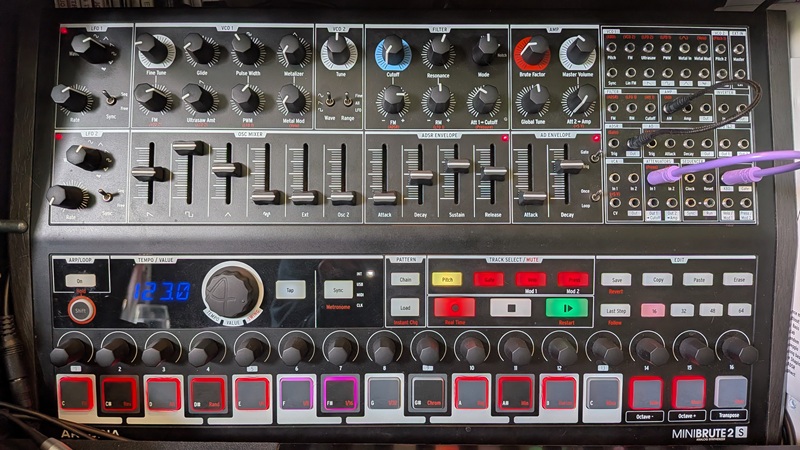
Price: $499 | Purchased: Sep 2023
Introduction
Welcome to my lengthy review of the Arturia MiniBrute 2S!
While it was my first hardware synthesizer, and thus holds a special place in my heart, I tried to be as fair as I was thorough. Because it was once my only synthesizer, I got to know this instrument very well; so I hope this review has something of value to both prospective and existing owners.
When I bought the MiniBrute 2S, I had chosen it because like every consumer, I wanted something inexpensive yet capable — two things that generally have an inverse relationship. Fortunately, it is possible to find the occasional product whose value exceeds expectations for the price. Having paid $365 for it after shipping and taxes, I believe the MiniBrute 2S is one of those exceptions.
Beyond value, I wanted something that would fit on my desk and have future compatibility with Eurorack. This led me to favor the 2S model over the 2, which swaps out the powerful sequencer for 25 keys. Even putting these factors aside, and even had I not already owned a small MIDI keyboard, the 2S seemed more capable and flexible. To this day, I can’t imagine it isn’t.
Though it took two years before I paired the MiniBrute 2S with its first Eurorack module, that promised synergy did pay off — with some caveats I describe below. More importantly, while adding a modular system has expanded the MiniBrute 2S’s versatility and value, it’s been a bonus in the truest sense of the word. Whether all on its own or within the context of a growing hardware setup, it has been a pleasure to play and to patch.
I won’t cover every little thing that the MiniBrute 2S does. That is not the purpose of this review. Please read the Review Philosophy section of the Synth Reviews page for more about that.
While you’re reading
This is a pretty long review. Why not listen to some music? This 29-minute jam was edited down from a 1-hour session that exclusively used percussion samples made with the MiniBrute 2S. You can find them at the end of the page. During the jam, those samples were triggered by a Digitakt II while the MiniBrute 2S was on main bass and noise duties.
The good
Immediacy with optional depth
The MiniBrute 2S is fundamentally basic. Leaving aside the patchbay, it features two VCOs, two envelope generators, two LFOs, a filter, and a mixer. These are basic subtractive synthesis building blocks that anyone who isn’t a complete novice will recognize — and that even a novice could get around to understanding in short order.
There is plenty to explore beyond these building blocks, but the MiniBrute 2S is designed to ensure it is not necessary. There is depth, but it is optional. This is in contrast to synthesizers whose impressive capabilities add extra steps to making even simple patches. The MiniBrute 2S benefits from immediacy and depth without either getting in the way of the other.
As synth history has shown, a wide variety of usable sounds can be built from even the most basic parts. Fred Welsh’s Synthesizer Cookbook details nearly 100 patches, spanning everything from strings and bass to percussion and sound effects, made with an even simpler toolkit than offered by the MiniBrute 2S. With one, it takes no time at all to copy any of those patches.
I emphasize immediacy because I am a big believer in its role in getting things done. Sitting down with a synth for an afternoon to explore sonic landscapes is meditative and fun, but immediacy is critical when you are in the middle of a production session and need to reach for a sound. If it takes too long to craft what you heard in your mind, it tends to slip away.
What you see is what you get
The MiniBrute 2S is truly “knob-per-function,” with each knob or fader only ever controlling one parameter at a time (the sequencer’s endless encoders are an exception). That makes it a good fit for live jams, when it is critical to avoid even small but potentially disruptive obstacles to the creative flow.
Notably, this remains a strength even as you delve into its patchbay to build more complex patches. Synths are often designed to offer simple control over simple features, or complex control over complex features. They may lump all features, simple and complex, under complex controls — like the ASM Hydrasynth or Elektron Digitone. Alternatively, they may segregate the two by offering simple controls and features on the front panel, and tucking away complex controls and features in menus or a mod matrix, as with the Novation Peak.
This last method can provide immediacy and clarity when making simple patches without compromising a synth’s ability to make complex sounds when you want them. Nonetheless, this approach does sacrifice immediacy and clarity when actually getting to task with creating those complex patches. Suddenly, the workflow involves a lot more tabbing through menu pages, scrolling through options, and making encoders catch up to their actual values. Even merely understanding what a patch is doing can become troublesome.
The advantage of semi-modular synthesizers like the MiniBrute 2S is that they get to have the best of both worlds: What you see is what you get even when you delve into the more advanced modulation capabilities.
If you want to stick to the basic subtractive synth building blocks, the MiniBrute 2S is normalled so that it is usable in that way without even touching the patchbay. And when you want it, the patchbay serves as a playground for more complex modulation and experimentation while baring all connections before you. They can be made and unmade at a moment’s notice, with a single patch cable.
Paraphonic powerhouse
The MiniBrute 2S is particularly good at pretending it isn’t monophonic. The keys to unlocking its paraphonic potential lie in its sequencer tracks, flexible routing, and eight — yes, eight — tone generators.
Eight tone generators
- VCO1 (full range)
- VCO2 (full range)
- Self-oscillating filter (~50 Hz - ~11 kHz)
- Looping AD envelope (20 Hz - 815 Hz)
- LFO1 (20 Hz - 100 Hz)
- LFO2 (20 Hz - 100 Hz)
- Mod1 sequencer (21 Hz - 100 Hz)
- Mod2 sequencer (21 Hz - 100 Hz)
Obviously, some of these are more limited than others — but all have merits. The filter can add overtones, and the looping envelope can enable you to play triads. Both can be accurately tracked to the keyboard for at least an octave. In the case of the AD envelope, this is done via careful modulation of the attack or decay, which has the bonus of also altering the waveshape, creating subtle timbral changes as you play different pitches.
When the Mod1 and Mod2 sequencers are set to an LFO mode, the rate of those LFOs can be raised into the audio range. Those rates are stepped rather than continuous, and only six of those steps accurately match semitones on the chromatic scale: A#0, D1, F#1, A#1, D2, and F#2. So it’s doubtful that you’ll often turn to the sequencers to create tones, but it’s still nice to have the option.
The dedicated LFOs are more precise, but their rate cannot be altered other than by manually turning a knob. This makes them more suited to background drones or FM duties.
Flexible input options
Even if a synthesizer has LFOs that can run at audio rate and even if it allows fine control over those rates, it may not provide any way to route the output of those LFOs directly into the audio path.
As a semi-modular synth, the MiniBrute 2S does. You can, in theory, hear up to seven of the eight tone generators at the same time even without the aid of external mixers. The VCOs and filter are already in the audio path, and the following inputs are available for the others:
- Ext: Routes to the mixer before the filter
- Metal In: Replaces the triangle wave in the mixer; eligible for wavefolding
- Master: Bypasses the filter and output VCA at full amplitude
You may also combine two signals in the VCA section of the patchbay, and of course use any of the tone generators, except the filter, for audio-rate modulation of other parameters.
Paraphonic patch example
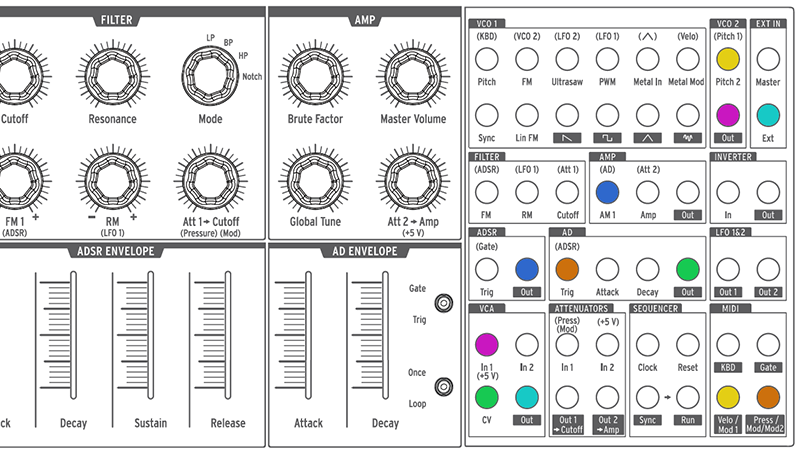
The sequencers are the final pieces of the paraphonic puzzle. Because Mod1 and Mod2 can be totally decoupled from KBD and Gate, it is possible to make the MiniBrute 2S do all sorts of different, unrelated things all at once and thus sound like more than just a single monophonic instrument.
The example patch above shows how to make the two VCOs respond to separate pitch and gate sequences, with those gates triggering different volume envelopes. Just make sure to set the Mod1 and Mod2 sequencers to Pitch and Gate, respectively.
The big caveat is that everything the MiniBrute 2S is doing will still be fed through the final output amplifier, so even if one of the oscillators is governed by its own VCA, it will only be heard when the final amp is open.
The one exception is if you patch that VCA straight to the Master input — thus bypassing the mixer and filter. With care, this can be effective; but nonetheless excludes a wide range of possible sounds. In any case, the interplay between the two sequences can still be interesting, and with the right external modules, these limitations effectively disappear.
Even all on its own, the MiniBrute 2S clearly has many options for creating multidimensional patches and interesting modulation. That makes it a great piece of hardware on which to jam out.
Eurorack compatibility
The MiniBrute 2S works very well on its own; but evidently, one of its big appeals is the promise that if you were to add any Eurorack modules or even another semi-modular synthesizer to your music studio, it would only take a couple of patch cables to make them talk to each other and open totally new creative avenues. The MiniBrute 2S mostly delivers on that promise but does have some nagging drawbacks I describe in The bad section below.
With modular or semi-modular equipment, the whole really is greater than the sum of its parts. Since getting a few modules, my Novation Peak is still the same instrument it was before. But the MiniBrute 2S has evolved into something greater than it was by itself.
One thing I like is that while it can it send or receive signals from my Eurorack, the MiniBrute 2S can do so while still being its own instrument in parallel.
After all, it is unlikely you would ever use every input and output in the patchbay simultaneously when using it as a standalone instrument. Consequently, when you add modules to your setup, you’re not forced to give anything up to use them along with the MiniBrute 2S. You can still do many of the things you were already doing with the synth before and use any leftover capabilities to add functionality to your modules.
The flexibility to combine the two systems as little or as much as you desire is very powerful. And I think this is especially true of the 2S model thanks to its additional sequencers compared to the MiniBrute 2.
Patch normalization
Like any semi-modular synth, all the MiniBrute 2S’s modulators are normalled to some destination. When I was just getting started, it confused me that connecting one of those modulators to a new destination didn’t break the default one — particularly in the case of the two attenuators. For example, if you patch LFO1 —> Att1 —> Lin FM and begin to turn the Att1 knob to dial in the modulation, you’ll hear LFO1 modulating the filter cutoff as well. If you don’t want this to happen, you must patch a dummy cable into the Cutoff input.
At first, this annoyed me, in part because I only had the eight stock cables and didn’t like using one just to break a connection. But the more I used the MiniBrute 2S, the more I came to like it. In effect, it ensured the synth’s modulators were, by default, multed to all sorts of (usually useful) destinations. Thanks to this, despite the lack of mults in the patchbay, I very rarely found myself in want of one even when building complex patches. A single Y-splitter I happened to have in an old box of cables was enough.
The bad
Pitch input behavior
Bizarrely, the pitch inputs for the oscillators respond differently to voltage. With nothing patched, VCO1’s pitch is normalled to the keyboard, and VCO2’s pitch is normalled to VCO1. As expected, if you manually connect the KBD output to VCO1’s pitch input, both VCOs will still sound at the appropriate pitch.
But if you connect KBD to the pitch input of VCO2, it will be unexpectedly transposed about two octaves up (23 semitones and some change on mine). You may change the base note for Pitch, Mod1, or Mod2 in the Arturia MIDI Control Center, but no setting will fix the offset between the two oscillators.
So if you intend to send disparate pitch information to the two oscillators, you’ll have to do some kind of transposition — either at the sequencer level or by tuning the oscillator(s) directly — to get things to sound the way you want.
It’s a straightforward workaround, but it is a nuisance and means that anything to do with routing V/Oct signals may need extra forethought.
Sneaky slew limiter
The outputs of LFO1, LFO2, and the Mod1 and Mod2 sequencers all have tiny amounts of slew that, while inaudible, impact how they interact with external modules. For example, if you send an LFO square wave output to a Eurorack input expecting a trigger, the input may register nothing at all.
This is fortunately not true of all the MiniBrute 2S’s modulators. The two envelopes generators and the default Gate track do not seem to have any trouble interacting with external trigger inputs.
This is a frustrating design, as it does compromise the MiniBrute 2S’s compatibility with Eurorack. It’s also very sneaky. I only discovered it once adding modules to my setup.
Noisiness
Every audio enthusiast knows the difficulty of keeping out unwanted noise. The MiniBrute 2S is no help there. Its outputs are unbalanced, making it more challenging to keep noise out of the audio path. Over the course of expanding my hardware setup, it has gone from being fairly quiet to increasingly sensitive to feedback from adjacent activity. I do not have this issue with my other hardware devices, and it can be more noticeable when connecting directly from the patchbay to a Eurorack system.
The notable
Sequencer workflow
The MiniBrute 2S’s sequencer is very powerful — but everything I said about the synth’s immediacy falls apart once you get to that part of its workflow.
Though it has four sequencers, it may instead be thought of having either one, two, or three, depending on what you’ve got them doing.
In their default states, all four tracks — KBD, Gate, Velocity, and Pressure — are tethered to each other. Adding a trigger on one track adds a corresponding one to all the others. This is much like a single sequencer track you might find on other devices, one with four parameters per step.
But because the MiniBrute 2S divides the parameters across separate tracks, it takes longer to tweak them. There is a lot of going back and forth between tracks. It is also necessary to turn an encoder to see the value of its associated parameter, adding more steps to the process.
However, I don’t include this section in The bad because the sequencer really is quite capable and certainly one of the main reasons the MiniBrute 2S offers such great bang for the buck.
Notably, it doesn’t actually have four parameters divided across four tracks; it has eight. All track types have secondary functions like slide rate and step repeat. On the LFO tracks, the secondary function is depth, saving you the need for an attenuator at the destination.
The KBD and Gate tracks cannot be changed or separated, but the Mod1 and Mod2 tracks become truly decoupled when set to any of their non-default outputs: Pitch, Gate, 1V, 2V, 5V, 8V, envelope, or various LFOs. In these cases, they may have independent playback speeds, lengths, and directions.
When used in this manner, the MiniBrute 2S genuinely feels like it has three separate sequencers and it becomes less tedious to work with those sequencers. And because they can output such a wide range of signals, they help to make the MiniBrute 2S incredibly versatile and powerful.
Brute Factor
In some very basic patches, the Brute Factor knob may not do much. I remember on one occasion thinking it was broken. This is fairly rare, though. Usually, dialing in the Brute Factor adds subtle warmth, then crushes the resonance, then destroys the sound into something utterly unlike the original.
This can be fun for intros, outros, or breaks. And on the way to that maximum distortion, you’ll pass several feedback sweet spots that are impossible to dislike, even if they might not be usable in the moment.
The Brute Factor also interacts strongly with the filter’s resonance, potentially adding another dimension to filter sweeps.
Some people criticize the MiniBrute 2S for sounding thin. They should probably play with the Brute Factor more!
Metal In
I am not especially fond of the MiniBrute 2S’s “Metalizer” when it is used in its basic form as a triangle wavefolder. It sounds harsh in a manner I personally find difficult to use in my music. However, it doesn’t have to be a triangle wave. You can override the triangle by patching any signal into the “Metal In” input.
I like using this best on modulators rather than tones to create complex LFOs that most analog synthesizers would struggle to match. I particularly like ones with hard edges like saws and squares, as this creates a sort of momentary fluttering not unlike what you might get from the Woggle output of a Wogglebug.
Slides
When set to pitch, velocity, pressure, or voltage, sequencer tracks have a secondary function that controls the rate at which the value slides from the previous step to the current one. This often sounds a little too subtle for my taste, which I think is largely owing to having to take the extra step of ensuring the corresponding gate is at 100% to ensure maximum effect.
If the gate is shorter than 100%, the slide may not complete before it closes, or may land on the destination value for such a brief time that you won’t actually hear it. For these reasons I find that slides sound best around a value of no higher than 50, at least for 303-like pitch-bending purposes.
Debunk: Mixer distortion
I have seen several comments on Reddit suggesting the MiniBrute 2S can sound harsh because its waveforms overdrive when their gain is pushed high enough in the mixer. This is untrue.
None of the waveforms distort — even at maximum amplitude, and even if all waveforms are maxed out at the same time. It is possible to introduce distortion using the Master Volume control, but this occurs at the output stage, not in the mixer. Some synths require gain staging; this isn’t one of them.
The MiniBrute 2S can sound harsh because its waveforms have fairly sharp edges, which can result in a buzzier sound. This is easily tamed with the filter and Brute Factor.
Samples
Below are unprocessed samples created with the MiniBrute 2S. I don’t actually sample this synthesizer very much, as I prefer sampling either percussion or polyphonic sounds. The MiniBrute 2S primarily lives in my setup as a live bassline machine or as a companion for my Eurorack system.
I’m happy with the drum samples, though, so I chose to share those. If I feel like it in the future, I may add another section with other types of samples.
Drums
There are many ways to create percussive sounds with an analog synthesizer. As far as sound sources go, you often don’t need more than white noise and a sine or triangle wave. Then it’s just a question of shaping the sound with modulators, and the MiniBrute 2S has plenty of options when it comes to that.
The companion Cook Book that comes with the synth includes a few percussion patches, as does Fred Welsh’s Synthesizer Cookbook I mentioned elsewhere. There are also many free online resources like this article on MusicRadar.com.
There was something uniquely fun about creating these samples over the course of a long afternoon. Unlike dialing in a tone that is probably going to be modulated during a performance anyway, designing a percussive sound for sampling requires far more precision. The slightest touch can have a significant impact on the final sound. It feels like an art in finding sweet spots to an even higher degree than creating regular patches.
The toms … aren’t very good!
Kick 1
Kick 2
Kick 808
Clap 1
Clap 3
Clap 5
Clap 2
Clap 4
Snare 1
Hat Closed
Tom High
Snare 2
Hat Open
Tom Low
Claves
Cowbell
Music
If you’re here because you actually read this beast of a review, you will hopefully have listened to the half-hour jam shared at the top.
For more music made with the MiniBrute 2S, please see the dedicated jams page. Many of the earliest jams were made almost exclusively with it.
Other than percussion and piano, the track Impulse Drive in my 2023 album Space Bunny was also made entirely with the MiniBrute 2S.
Thank you for reading! (And hopefully, listening!)